
Logitech G305 Lightspeed
4.6Product rating
HERO optical sensor
Lightspeed wireless receiver
250-hour AA battery
Lightweight 3.4 oz body
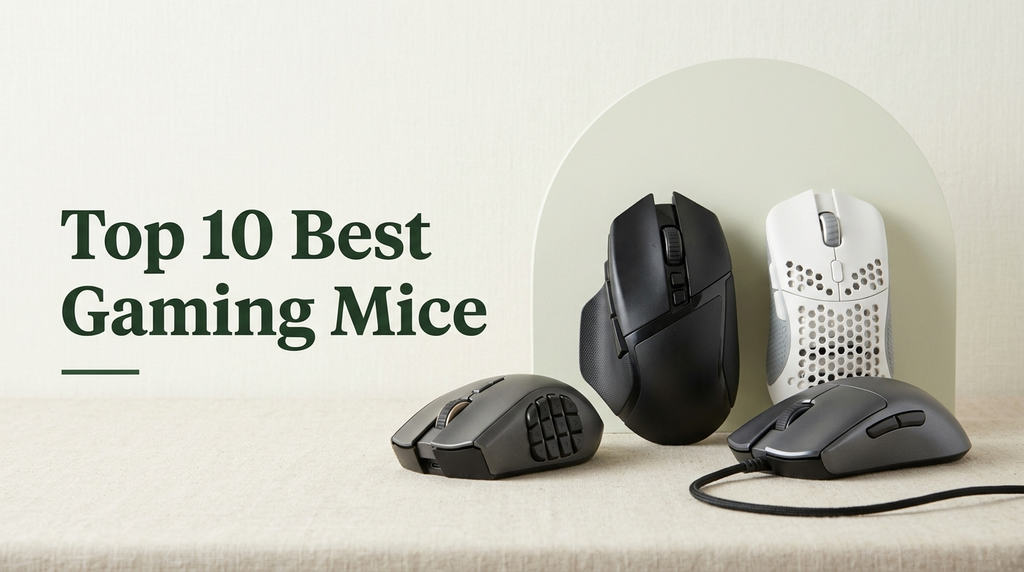
Choosing a gaming mouse in 2025 means balancing sensor precision, weight, button layout, wireless performance, and battery life against the way you actually play. This guide compares 10 well-known options across competitive shooters, MMO-style games, casual sessions, and travel setups so you can match the right mouse to your grip, your desk, and your budget.
The gap between an entry-level wired mouse and a flagship wireless model is wider than it looks. Sensor accuracy, click feel, polling rate, body shape, and software support all shape how a mouse behaves during long sessions. Even small differences in weight or thumb-button placement can change how comfortable a mouse feels after an hour of play.
The products below were compared using publicly available specifications, manufacturer-stated features, and customer-rating snapshots at the time of writing. Factors considered include sensor type and advertised DPI, click switch technology, programmable button count, weight and grip style, wired or wireless connectivity, battery life where applicable, and software ecosystem. No hands-on lab testing was performed, so performance claims reflect published specifications rather than measured benchmarks.
4.6Product rating

4.5Product rating

4.6Product rating
A quick side-by-side look at how each mouse stacks up on sensor, weight, connectivity, and button layout to help narrow down the shortlist before reading the full reviews.
Swipe across to compare all columns
| Product | Key highlights | Rating | Explore |
|---|---|---|---|
|
Best value
Logitech G305 Lightspeed
|
12,000 DPI sensor
Lightspeed wireless connection
250-hour AA battery
Six programmable buttons
|
4.6Product rating | Check Price |

Best for Button-Heavy Games
Logitech G502 Hero
|
25,600 DPI sensor
Eleven programmable buttons
Adjustable weight system
Dual-mode scroll wheel
|
4.6Product rating | Check Price |

Best for Ergonomic Grip
Razer Basilisk V3
|
26K DPI sensor
HyperScroll tilt wheel
Eleven programmable buttons
Chroma RGB zones
|
4.6Product rating | Check Price |
|
Premium pick
Logitech G PRO X2 Superstrike
|
44,000 DPI sensor
8 kHz polling rate
Haptic trigger feedback
60-90 hour battery
|
4.6Product rating | Check Price |

Best for FPS Competitive Play
Razer Viper V3 HyperSpeed
|
82-gram lightweight body
30K optical sensor
280-hour AA battery
HyperSpeed wireless connection
|
4.4Product rating | Check Price |

Best value
Redragon M612
|
8000 DPI sensor
Eleven programmable buttons
RGB backlit modes
Wired USB connection
|
4.6Product rating | Check Price |

Best for Marathon Sessions
Razer Basilisk V3 X HyperSpeed
|
18K DPI sensor
HyperSpeed and Bluetooth
285-hour AA battery
Nine customizable controls
|
4.4Product rating | Check Price |

Best for MMO and MOBA
Razer Basilisk V3 Pro 35K
|
35K optical sensor
140-hour rechargeable battery
Thirteen customizable controls
13-zone Chroma lighting
|
4.4Product rating | Check Price |
Best for POWERPLAY Setups
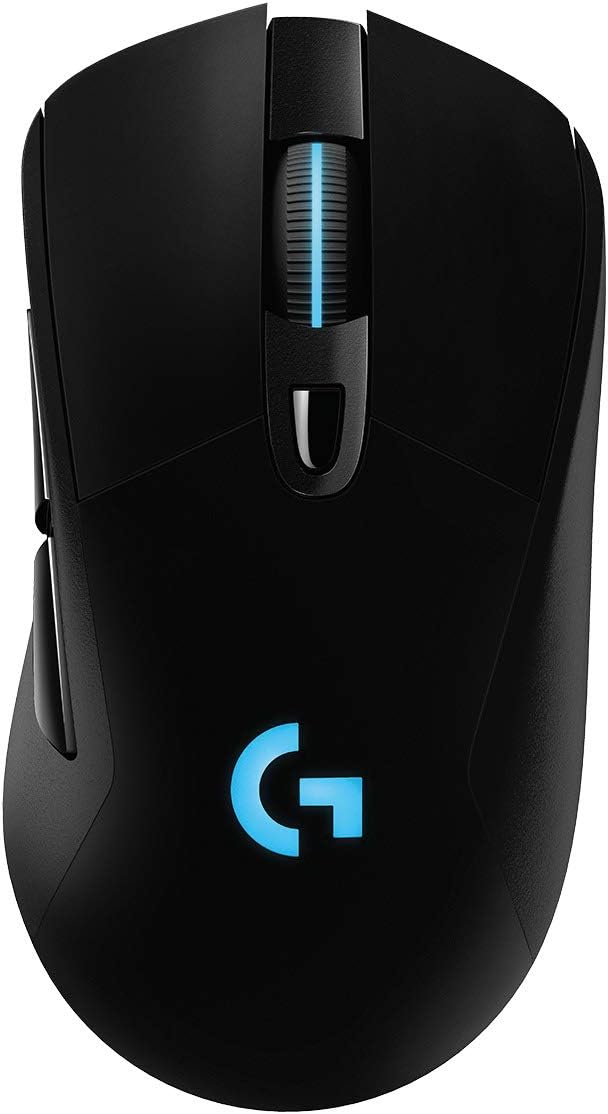
Logitech G703 Lightspeed
|
HERO 25K sensor
35-hour rechargeable battery
POWERPLAY charging compatible
Six programmable buttons
|
4.5Product rating | Check Price |
|
Best overall
Logitech G PRO X Superlight 2
|
44,000 DPI sensor
8 kHz polling
60-gram lightweight body
95-hour battery life
|
4.5Product rating | Check Price |
The G305 is a sensible choice for anyone who wants cord-free play without stepping up to a flagship price. Logitech kept the design simple and symmetrical-leaning, so it tends to suit smaller to medium hands using claw or fingertip grips. For students, laptop gamers, and anyone upgrading from an office mouse, it covers the essentials without any frills.
The HERO sensor advertises precision up to 12,000 DPI with 400 IPS tracking, which is more than most players will ever need outside of competitive aim training. The Lightspeed 2.4 GHz receiver delivers a 1 ms report rate over its own USB-A dongle, which generally feels more consistent than Bluetooth for fast-paced games. Six programmable buttons, including two on the thumb side, cover standard first-person shooter and MOBA layouts.
Battery life is the headline feature in daily use. A single AA cell is rated for around 250 hours of continuous play, and endurance mode in Logitech G HUB can stretch that further. Swapping a battery is faster than waiting for a charge, which some travelers prefer, though it does add the small ongoing cost of replacements or a rechargeable AA set. The nano receiver tucks into the body, making it easy to drop in a laptop bag.
Think of the G305 as a dependable workhorse rather than a specialist tool. If you want RGB lighting, extra side buttons for MMO rotations, or ultralight competitive feel below 70 grams, you can do better elsewhere. For a first wireless gaming mouse that will not quickly feel outdated, though, it remains one of the easiest recommendations in its price band.
The compact shell is also a reasonable match for younger gamers or anyone whose current mouse feels too large.
Hiding the receiver inside the mouse means there is no loose dongle to lose, and AA power removes the need to pack a charging cable. For laptop setups in hotels or lectures, this combination is genuinely convenient.
Players with large hands using a full palm grip may find the body too short, and anyone who wants customizable RGB lighting or more than two side buttons should look at a larger model like the G502 Hero or Basilisk V3.
We may earn a commission when you buy through this link, at no additional cost to you.
The G502 Hero has become something of a standard recommendation for players who want control over as many actions as possible without touching the keyboard. Eleven programmable buttons give room for weapon swaps, voice chat toggles, ability binds, and productivity shortcuts, which makes it as useful in MMOs and strategy games as it is on a general-purpose desk.
At its core sits the HERO sensor advertised up to 25,600 DPI with no smoothing, acceleration, or filtering. For most players, raw DPI is less important than consistent tracking, and the HERO sensor family has a strong reputation for reliability. The infinite-scroll wheel toggles between a free-spinning mode for long documents and a ratcheted mode for weapon cycling, which is a genuinely useful dual-purpose feature.
Weight is the main trade-off. The G502 is heavier than modern esports-focused shells, but the five 3.6 gram adjustable weights let you tune the balance to your preference. If you like the stability of a slightly heavier mouse that stays planted on the pad, this flexibility is a plus. If you prefer the flicky feel of a sub-70 gram shooter mouse, this will feel sluggish by comparison.
The G502 Hero suits buyers who want a wired, no-maintenance mouse with deep customization and solid tracking. It is a particularly good fit for mixed-use desks that bounce between gaming, creative work, and office tasks, where the extra buttons repay the initial setup time.
Spending a few minutes in Logitech G HUB to map side buttons to common actions like push-to-talk, screenshots, or weapon slots usually pays off within the first few sessions. Profiles can be stored per game so the layout changes automatically.
Competitive FPS players chasing the lightest possible shell will prefer the PRO X Superlight 2 or Razer Viper V3 HyperSpeed, and left-handed users should look at a symmetrical ambidextrous model instead.
We may earn a commission when you buy through this link, at no additional cost to you.
The Basilisk V3 is aimed squarely at players who sit at the same desk for hours and want a mouse their palm can rest on. The sculpted shape and dedicated thumb rest take pressure off the hand during long sessions, which some users find more sustainable than a flat ambidextrous shell.
Razer rates the Focus Plus sensor up to 26,000 DPI, with the Gen 2 optical switches advertising a 0.2 ms actuation and a 70-million click lifespan. For most buyers, the switch feel is the more noticeable difference day to day: crisp primary clicks that are hard to misfire. Eleven programmable buttons give room for a reasonable set of macros without feeling overwhelming.
The HyperScroll tilt wheel is the standout convenience. Tactile mode gives clear detents for weapon cycling, while free-spin mode is handy for scrolling long webpages, spreadsheets, or chat logs. Combined with the Chroma lighting that can sync with supported games, the Basilisk V3 doubles as a desk centerpiece without becoming distracting during play.
Choose this one if comfort and features matter more than being wire-free. It is a strong fit for streamers, office workers who game at the same desk, and players who dislike the smaller shells favored by competitive shooters.
The pronounced thumb rest and higher hump make the Basilisk V3 best for palm grip, and still comfortable for claw. Fingertip grip users may find it bulky and should test the shape before committing.
Left-handed players and anyone wanting a wireless build should look at an ambidextrous mouse or the wireless Basilisk V3 Pro instead.
We may earn a commission when you buy through this link, at no additional cost to you.
The PRO X2 Superstrike targets the top end of the market, where small gains in click speed and consistency can matter in competitive play. Logitech advertises clicks that are 30 ms faster, 10 actuation levels, and 5-level rapid trigger reset, giving fine control over how light or heavy each click feels.
Underneath is the HERO 2 sensor rated at over 888 IPS, 88 g acceleration, and up to 44,000 DPI. Combined with 8 kHz Lightspeed polling, the technical ceiling is well beyond what most games require, but the point is consistency and headroom rather than chasing numbers. Advertised battery life ranges from 60 to 90 hours depending on polling and lighting choices.
The haptic Inductive Trigger System is the most unusual feature. By providing physical feedback through the buttons, it can give subtle cues tied to in-game actions. Whether that feels gimmicky or genuinely useful depends on the games and settings you play; it is worth exploring in Logitech G HUB rather than ignoring out of habit.
This mouse is for players who are willing to pay for every edge: pros, ranked climbers, and enthusiasts who want flagship hardware. Casual players will not see the full benefit and should save money with the Superlight 2 or G305 instead.
Try starting at a mid-level actuation point and shortening it only if you find yourself missing fast taps. Setting it too light early on can lead to accidental double clicks until your fingers adapt.
Buyers who mostly play slower-paced single-player or cooperative games will not benefit from the advanced trigger system and should pick a less expensive model with similar sensor quality.
We may earn a commission when you buy through this link, at no additional cost to you.
The Viper V3 HyperSpeed is designed for players who want a lightweight competitive shape without jumping to a premium flagship. At 82 grams with an AA battery installed, it sits in a comfortable middle ground between heavier daily drivers and sub-60 gram esports shells.
The Focus Pro 30K optical sensor is positioned to track reliably across many surfaces, including glass, which can be useful for players without a dedicated mousepad. Gen 2 mechanical switches advertise a 60-million click lifespan, and the on-mouse DPI button lets you flip between five preset sensitivities quickly during a match.
Battery life up to 280 hours on a single AA is a practical advantage for anyone who dislikes charging cables. HyperSpeed wireless aims to stay stable in noisy environments like LAN events, where many 2.4 GHz devices compete for airtime. The streamlined, cosmetic-light build keeps the focus on performance rather than lighting effects.
This is a strong pick for FPS, battle royale, and arena shooter players who want responsive wireless at a sensible price. If you want more buttons, haptics, or RGB, look elsewhere; the Viper V3 HyperSpeed is deliberately pared back.
The symmetrical body suits claw and fingertip grips best. Pairing it with a smooth cloth pad helps lightweight mice shine, since friction has a bigger relative effect on movement than it does on heavier shells.
MMO players who need many thumb buttons should look at the Basilisk V3 Pro, and anyone focused on comfort over raw speed may prefer the ergonomic Basilisk shape.
We may earn a commission when you buy through this link, at no additional cost to you.
The Redragon M612 is aimed at buyers who want gaming-oriented features without the premium brand pricing. It is a straightforward wired mouse with an 8000 DPI sensor, 11 programmable buttons, and RGB lighting across five modes, which is a notable feature set at this price.
The 11 buttons include a rapid-fire key and two side macro buttons that can be reassigned through the included software. For MOBA, MMO, or productivity use, that leaves room to bind common actions to the mouse rather than reaching across the keyboard. The default DPI steps are set at 500 to 4000, with software control up to 8000 for players who want finer tuning.
The claw-grip oriented shape with rubberized texture on the left side helps keep the mouse steady, and the frosted surface resists fingerprints better than glossy plastic. It is clearly a budget build, so cable flexibility, sensor refinement, and software polish are not at flagship levels, but the fundamentals work for everyday gaming.
This is a sensible first upgrade from a basic office mouse or a backup unit for a secondary PC. If you are new to gaming peripherals and not sure how much you will use advanced features, the M612 lets you experiment without a large investment.
Casual gamers, students, and anyone building a budget setup usually get the most out of this mouse. The included macro buttons also make it a reasonable productivity tool for repetitive tasks.
Competitive players who notice subtle differences in sensor behavior and glide should step up to a Logitech or Razer model, since budget mice can show their limits at high sensitivities.
We may earn a commission when you buy through this link, at no additional cost to you.
The Basilisk V3 X HyperSpeed brings the familiar Razer ergonomic shape into a wireless, budget-friendly body. It supports both HyperSpeed 2.4 GHz for gaming and Bluetooth for office or travel use, which makes it a practical choice for anyone who moves between a desktop and a laptop.
The 5G Advanced 18K optical sensor is more than enough for mainstream gaming at normal sensitivities, and the Gen 2 mechanical switches aim for a 60-million click lifespan. Nine customizable controls give room for essential binds without the sprawling layout of an MMO mouse. On-the-fly DPI toggling helps when switching between slow aim and fast navigation.
Battery life is a highlight. Razer advertises up to 285 hours on HyperSpeed and up to 535 hours on Bluetooth from a single AA cell, which should cover weeks of normal use between swaps. Removing the RGB lighting helps those numbers and keeps the mouse quieter looking on a professional desk.
If you want the comfort and shape of the Basilisk line without paying flagship prices, this is a strong middle ground. It is particularly well suited to buyers who want a single mouse to pair with multiple computers via Bluetooth while keeping low-latency wireless available for gaming.
Using HyperSpeed on your main PC and Bluetooth with a laptop lets one mouse cover both. Keep a spare AA on hand to avoid interruptions, since battery swaps are quick but easy to forget.
Players who need top-tier polling rates, haptics, or the longest flagship battery life should look at the Basilisk V3 Pro or PRO X2 Superstrike instead.
We may earn a commission when you buy through this link, at no additional cost to you.
The Basilisk V3 Pro 35K takes everything that makes the Basilisk shape popular and layers in flagship wireless features. For players who want the comfort of a sculpted ergonomic mouse without being tied to a cable, this is one of the more complete options on the market.
The Focus Pro 35K optical sensor Gen 2 is advertised to track well across a wide range of surfaces, including glass, with 1-DPI step adjustments for fine tuning. Thirteen customizable controls, including a multi-function trigger, allow deep binding setups for MMOs, strategy games, and productivity macros. Razer rates the Gen 3 optical switches at 90 million clicks with a 0.2 ms actuation.
Battery life is quoted at up to 140 hours on HyperSpeed wireless, and the Mouse Dock Pro or HyperPolling Wireless Dongle is required separately for true 8 kHz polling. The HyperScroll tilt wheel adds flexibility, with tactile, free-spin, and smart modes that can switch automatically based on scroll speed. The 13-zone Chroma lighting with underglow makes this one of the most expressive mice visually.
Buyers who want the full Razer ergonomic experience with top-tier internals should start here. Casual players and FPS specialists may find the shape heavier than they prefer and should consider the lighter Viper V3 HyperSpeed.
If you regularly play games with many abilities or hotkeys, mapping core actions to the extra controls can meaningfully reduce finger travel. For simpler games, those buttons will sit unused.
Players focused purely on low-weight shooter performance should pick the PRO X Superlight 2 or Viper V3 HyperSpeed instead of this heavier ergonomic shape.
We may earn a commission when you buy through this link, at no additional cost to you.
The G703 Lightspeed is a familiar face among wireless gaming mice, with a comfortable right-handed shape and a sensible feature list. It is a good fit for players who want a wireless upgrade without a radical design change from a traditional mouse.
The HERO 25K sensor offers 1:1 tracking with 400+ IPS and up to 25,600 DPI, which comfortably covers any realistic in-game sensitivity. Six programmable buttons, metal-spring button tensioning, and an optional 10 gram weight let you adjust the feel to taste. Rubber side grips and the sculpted palm rest make it approachable for long sessions.
Advertised battery life is around 35 hours with default lighting and up to 60 hours with lighting off, which should see most players through a week of play per charge. Charging is handled over the included Micro-USB cable; buyers who already live in a USB-C world may find this a minor annoyance. The real differentiator is POWERPLAY support, which allows continuous wireless charging through a compatible mousepad sold separately.
The G703 suits buyers who like Logitech's shape language, want a dependable mid-range wireless mouse, and are interested in the POWERPLAY ecosystem. Players chasing the lightest shell or the longest battery life should look at the Superlight 2 or Viper V3 HyperSpeed instead.
The POWERPLAY mousepad is a notable additional cost, so factor it into the budget. For players who never want to think about charging again, the combination can be worthwhile; for others, standard charging works fine.
Fingertip-grip and small-handed users may prefer the smaller G305, and anyone focused on esports-level weight should look at the PRO X Superlight 2.
We may earn a commission when you buy through this link, at no additional cost to you.
The PRO X Superlight 2 updates one of the most popular competitive shapes with a more modern feature set. For players who want elite-level responsiveness in a familiar ambidextrous body, it is a natural first choice.
The HERO 2 sensor tracks at over 888 IPS and up to 44,000 DPI with no smoothing or acceleration, paired with Lightspeed wireless at 8 kHz polling. LIGHTFORCE hybrid switches aim to combine the precision of optical actuation with the tactile feel of a mechanical click. Zero-additive PTFE feet are designed to glide smoothly on a wide range of pads.
At around 60 grams with USB-C charging and 95-hour battery life, the Superlight 2 improves on the original on nearly every practical measure. POWERPLAY compatibility means it can be paired with a charging mousepad to effectively eliminate downtime. The minimal button layout focuses on primary clicks, scroll, and a pair of thumb buttons, which is deliberate for competitive play.
This is the mouse for players who put FPS, battle royale, or arena shooter performance first. If you want many extra buttons, strong ergonomic sculpting, or a lower price, the G502 Hero or G305 are better matches for those needs.
A sub-60 to 60 gram shell changes how aggressive flick aiming feels. If you have only used heavier mice, give yourself a few days to adjust your in-game sensitivity before judging it.
Players who rely on many side buttons or who dislike flat ambidextrous shapes should pick the Basilisk V3 Pro 35K or G502 Hero, which prioritize buttons and ergonomics over weight.
We may earn a commission when you buy through this link, at no additional cost to you.
A gaming mouse is a small purchase that touches your hand for hours each day. The right one depends on how you play, where you play, and how much you care about optimization versus simplicity.
The sensor is the heart of any gaming mouse. Modern optical sensors from Logitech, Razer, and other major brands easily exceed what most games require, so the real question is how consistent the tracking feels at your preferred sensitivity. A good sensor avoids smoothing, acceleration, and jitter, which means the cursor moves exactly as your hand does. Advertised figures like 25,000 or 44,000 DPI are headline numbers; most players operate between 400 and 3,200 DPI depending on screen size and game genre.
IPS (inches per second) and maximum acceleration figures matter more for low-sensitivity shooter players who make large arm swipes across a mousepad. If a sensor cannot keep up with fast motion, it spins out or stops tracking briefly, which can cost shots in competitive play. Flagship sensors like the HERO 2 and Focus Pro 30K/35K are designed with large margins so they stay accurate even during aggressive flicks.
For most buyers, any mouse from a reputable gaming brand will have a sensor well beyond their needs. Choose based on shape, weight, and buttons; the sensor should be a baseline requirement rather than the deciding factor.
Weight has become a central talking point in gaming mice, with ultralight shells often sitting between 50 and 70 grams and traditional ergonomic designs often above 90 grams. A lighter mouse makes rapid aim adjustments easier, which is why competitive FPS players often prefer them. A heavier mouse can feel more stable and planted, which suits slower, more deliberate games like strategy titles or MMOs.
Shape is just as important and often more personal. Right-handed ergonomic shapes with a pronounced thumb rest, like the Basilisk line, suit palm grip and larger hands. Symmetrical shapes, like the Superlight and Viper families, work with claw and fingertip grips and accommodate most hand sizes. Measuring your hand from wrist to middle fingertip and comparing it to the mouse's length is a reliable way to narrow your options before buying.
If you are unsure, start with a familiar shape close to a mouse you have liked in the past, then experiment later with different form factors as your preferences become clearer.
Wireless gaming mice have matured to the point where latency is no longer a practical concern for most players. Technologies like Lightspeed and HyperSpeed deliver response times close enough to wired that only a small percentage of competitive players can reliably tell the difference. The real benefits are cable-free movement and a cleaner desk, which many people value more than any theoretical performance edge.
Wired mice remain attractive for a few reasons. They are generally cheaper for the same feature set, they never need charging, and they avoid any wireless interference in crowded environments. If you leave your mouse at one desk and prefer not to think about batteries, a wired model like the G502 Hero or Basilisk V3 can be a perfectly rational choice.
Decide first whether a cable annoys you in daily use. If it does, wireless is worth the premium; if it does not, the money saved can go toward a better sensor, more buttons, or a nicer mousepad.
Battery life ranges widely across gaming mice, from around 35 hours on some rechargeable models to over 250 hours on AA-powered units running in power-saving modes. The right number depends on how often you want to think about charging. If you play daily, anything under 40 hours means plugging in weekly; longer-life models can stretch between charges or battery swaps for a month or more.
Rechargeable mice typically use USB-C now, though some older models still rely on Micro-USB. USB-C is more convenient because the cable is reversible and often shared with other devices. AA-powered mice avoid charging entirely but add the small ongoing cost of batteries; using high-quality rechargeable AA cells is an easy way to make them nearly as convenient as integrated batteries.
POWERPLAY-style wireless charging mousepads can effectively remove the issue altogether for compatible mice. They cost more up front but can be worthwhile for players who hate interruptions.
Button count ranges from a minimal 5 to 6 on competitive shooter mice up to 12 or more on MMO-focused designs. More buttons are not automatically better; unused buttons add weight and complexity. Think about the games you actually play and the actions you most often need. Push-to-talk, weapon swaps, ability binds, and screenshots are common candidates for mouse buttons.
Software matters because it unlocks that customization. Logitech G HUB and Razer Synapse let you create per-game profiles, remap buttons, adjust DPI stages, and tune lighting. Both are reasonably powerful, though they can be heavy to install and sometimes require updates. Simpler brands often offer lighter software with fewer features but less overhead.
If you want a plug-and-play experience with minimal setup, a mouse with on-mouse DPI toggling and simple software is enough. If you enjoy tweaking and optimizing, lean into the full software ecosystem to get the most from your purchase.
Grip style is one of the most overlooked factors. Palm grip rests the entire hand on the mouse and works best with larger, sculpted shapes. Claw grip arches the fingers for faster clicks and suits medium-sized, slightly shorter mice. Fingertip grip uses only the fingertips for maximum control and typically pairs with smaller, lightweight shells.
Hand size interacts with grip. A large hand on a small mouse often ends up in fingertip grip whether intended or not, while a small hand on a large ergonomic mouse can struggle to reach side buttons. Spending a minute measuring your hand and comparing it to the dimensions listed on product pages prevents disappointment later.
If you can, visit a store to try physical samples before ordering. If not, read community discussions about specific shapes with your hand size noted; those recommendations are usually more useful than general reviews.
Gaming mice span a wide price range, from under $20 to well over $150. The jump from budget to mid-range tends to buy noticeably better sensors, switches, and build quality. The jump from mid-range to flagship buys refinements like lower weight, higher polling, haptics, and premium materials; the returns are smaller but can matter at the top of competitive play.
Think about how long you plan to keep the mouse. A quality mid-range or flagship mouse often lasts several years before switches start to show wear, which can make the per-year cost reasonable even at higher price points. Budget mice can be excellent short-term choices and useful backups but may need replacing sooner.
Set a realistic budget, then buy the best shape and features within it rather than overspending on specifications you will not use.
When you first set up a new gaming mouse, start by installing the manufacturer's software to update firmware and configure basic settings. Set your DPI steps to values that make sense for your games; many FPS players use 400 to 1,600 DPI with higher in-game sensitivities, while productivity work tends to feel better at 1,600 to 3,200. Disable Windows pointer precision for the most consistent tracking, since the mouse's own sensor is already designed to handle acceleration correctly.
Keep the mouse feet and sensor clean to maintain smooth movement. Wipe the feet with a dry microfiber cloth every few weeks and check for debris stuck to the edges, which can cause scratching on your mousepad. A dry cotton swab works well for cleaning around the sensor lens. For the body, a slightly damp cloth removes skin oils and dust; avoid liquid cleaners near buttons and ports.
For wireless mice, charge or swap batteries before the mouse fully dies to avoid interrupting a session. If your mouse supports a lower-power mode for travel, use it when gaming at the highest polling rate is not necessary. Store the mouse away from magnetic surfaces and avoid dropping it, since impacts can misalign internal components. With sensible care, a quality gaming mouse should give years of reliable use.
Not directly. DPI controls how far the cursor moves per inch of mouse movement, but most players use settings far below the maximum. What matters more is finding a sensitivity that lets you aim precisely without lifting the mouse constantly. Many competitive FPS players use 400 to 1,600 DPI with higher in-game sensitivity settings. Experiment within a comfortable range and stick with it long enough to build muscle memory.
For reputable wireless gaming mice using dedicated 2.4 GHz technology, latency is low enough that most players will not notice a difference compared to wired. Technologies like Lightspeed and HyperSpeed are designed specifically for gaming. Bluetooth is a different story: it is fine for casual play and productivity but not ideal for fast-paced competitive games. If you want wireless, make sure the mouse includes a dedicated 2.4 GHz dongle.
That depends on the games you play. FPS and battle royale players usually get along fine with 5 to 6 buttons: left, right, scroll click, and two thumb buttons. MMO, MOBA, and strategy players often appreciate more buttons for abilities and macros. If you are new to gaming, start simple and see which actions you reach for most on the keyboard; those are good candidates for extra mouse buttons later.
Most games run comfortably at 1,000 Hz, which has been the gaming standard for years. Higher polling rates like 4,000 or 8,000 Hz can reduce input latency slightly but demand more from your CPU and may shorten wireless battery life. Unless you have a high-end system and compete at a serious level, 1,000 Hz is still an excellent choice. Try higher rates only if you have the hardware headroom to spare.
Yes, but personal preference plays a large role. Lighter mice make rapid aim changes easier and are often preferred by competitive shooter players. Heavier mice feel more stable and planted, which some players find more comfortable for slower games. If you have only used standard office mice, a 60 to 80 gram gaming shell will feel noticeably more responsive. Try a shape that matches your grip before focusing on weight.
They can be, depending on how often you play and what matters to you. Flagship mice offer the best sensors, lightest shells, longest battery life, and most refined switches. For casual players, the gains over a solid mid-range mouse are small. For competitive or enthusiast players who use the mouse for hours daily, the extra cost per year of use is often reasonable. Match the price to the frequency and importance of your use.
Absolutely. Gaming mice tend to have accurate sensors, responsive switches, and comfortable shapes, all of which help with everyday productivity. Extra buttons can be mapped to shortcuts like copy, paste, or switching browser tabs. If anything, people who buy a gaming mouse for gaming often find it quickly replaces the office mouse they used before, since it is more pleasant to use for long sessions.
A quality gaming mouse should last several years with normal use. The most common failure points are the main click switches, which can develop double-click issues after millions of actuations. Modern optical switches extend that lifespan considerably. Cables and feet wear out faster on wired models with heavy use. Keeping the mouse clean and avoiding drops helps it last longer, as does updating firmware when the manufacturer releases improvements.
Mechanical switches use a physical contact that closes to register a click. Over time, those contacts can wear and sometimes cause unwanted double clicks. Optical switches use a light beam that is broken when the button is pressed, which avoids physical contact wear and often reduces debounce delay. Many flagship mice now use optical or hybrid designs for improved reliability and faster response, though both types can feel excellent in practice.
A dedicated gaming mousepad is not required but often improves the experience. Larger pads give room for low-sensitivity aiming, and consistent surfaces help the sensor track reliably. Cloth pads tend to feel smoother and quieter, while hard pads offer faster glide and more durability. If your current surface is uneven, textured, or shiny, upgrading to a proper mousepad is one of the most cost-effective improvements you can make.
If you want a single recommendation, the Logitech G PRO X Superlight 2 is the most well-rounded flagship in this group. It combines a lightweight competitive shape, the HERO 2 sensor, 8 kHz Lightspeed polling, USB-C charging, and strong battery life in a design trusted by many professional players. The minimal button layout and premium price mean it is not the right choice for everyone, but for shooter-focused buyers it is hard to beat.
For buyers with different priorities, the shortlist adapts well. The Logitech G305 Lightspeed offers an affordable wireless entry point with excellent battery life. The G502 Hero remains a reliable pick for mixed-use desks that benefit from many buttons. The Basilisk V3 line serves comfort-focused players, while the Basilisk V3 Pro 35K adds flagship wireless features. The Razer Viper V3 HyperSpeed is a smart option for competitive FPS players who want a lightweight wireless mouse without flagship pricing.
When making the final decision, start with shape and grip style, then narrow by connectivity, weight, and buttons. Match the mouse to the games and tasks you actually spend time on, not the ones you occasionally imagine playing. A mouse that fits your hand and your routine will feel better every day than a more expensive model with features you never use. Any of the ten options above can be the right choice for the right buyer.