
Samsung Odyssey G5 G51F 27"
4.7Product rating
QHD 1440p resolution
180Hz refresh rate
1ms response time
Height-adjustable stand
Picking a gaming monitor in 2026 means balancing panel type, refresh rate, resolution, response time, HDR support, and port selection against the games you actually play and the GPU driving the display. This guide looks at 10 strong options spanning Fast IPS, QD-OLED, and curved VA designs so you can match the right screen to your desk, your graphics card, and your budget.
The gap between a solid 1440p 180Hz IPS panel and a 240Hz QD-OLED is wider than the spec sheet suggests. Pixel response, contrast, motion clarity, HDR brightness, and stand ergonomics all shape how a monitor feels in daily use. Even smaller choices like a glossy or matte coating or the number of HDMI 2.1 ports can affect whether a display suits your setup.
The monitors below were compared using publicly available specifications, manufacturer-stated features, and customer-rating snapshots at the time of writing. Factors considered include panel technology, native resolution, maximum refresh rate, advertised response time, adaptive sync support, HDR certification, port selection, stand adjustability, and curvature. No hands-on calibration or lab testing was performed, so performance claims reflect published specifications rather than measured benchmarks.
4.7Product rating

4.6Product rating

4.5Product rating
A quick side-by-side look at how each display stacks up on panel type, refresh rate, resolution, and standout features to help narrow the shortlist before reading the full reviews.
Swipe across to compare all columns
| Product | Key highlights | Rating | Explore |
|---|---|---|---|
Best value Samsung Odyssey G5 G51F 27" | 27-inch QHD panel 180Hz refresh rate 1ms response time AMD FreeSync support | 4.7Product rating | Check Price |
 Best for HDR Immersion Samsung Odyssey OLED G6 27" | 27-inch QD-OLED panel 240Hz refresh rate 0.03ms response time FreeSync Premium support | 4.7Product rating | Check Price |
 Best for Immersive Curved Play Samsung Odyssey G55C 32" | 32-inch curved QHD 1000R curvature display 165Hz refresh rate HDR10 color support | 4.4Product rating | Check Price |
 Best Large Flat IPS Samsung Odyssey G5 G50F 32" | 32-inch IPS QHD 180Hz refresh rate 1ms response GtG Height-adjustable ergonomic stand | 4.5Product rating | Check Price |
 Best Ultrawide for Immersion Samsung Odyssey G5 34" Ultrawide | 34-inch ultrawide WQHD 1000R curved VA 165Hz refresh rate FreeSync Premium adaptive | 4.3Product rating | Check Price |
Premium pick LG UltraGear 27GX704A OLED | 27-inch QHD OLED 240Hz refresh rate 0.03ms response time Dual HDMI 2.1 | 4.5Product rating | Check Price |
 Best for High Refresh IPS AOC Q27G41ZE 260Hz IPS | 27-inch QHD IPS 260Hz overclocked refresh 0.3ms MPRT response G-Sync compatible support | 4.6Product rating | Check Price |
Best overall ASUS TUF VG27AQ3A 180Hz | 27-inch Fast IPS 180Hz QHD panel 1ms response time G-Sync compatible support | 4.6Product rating | Check Price |
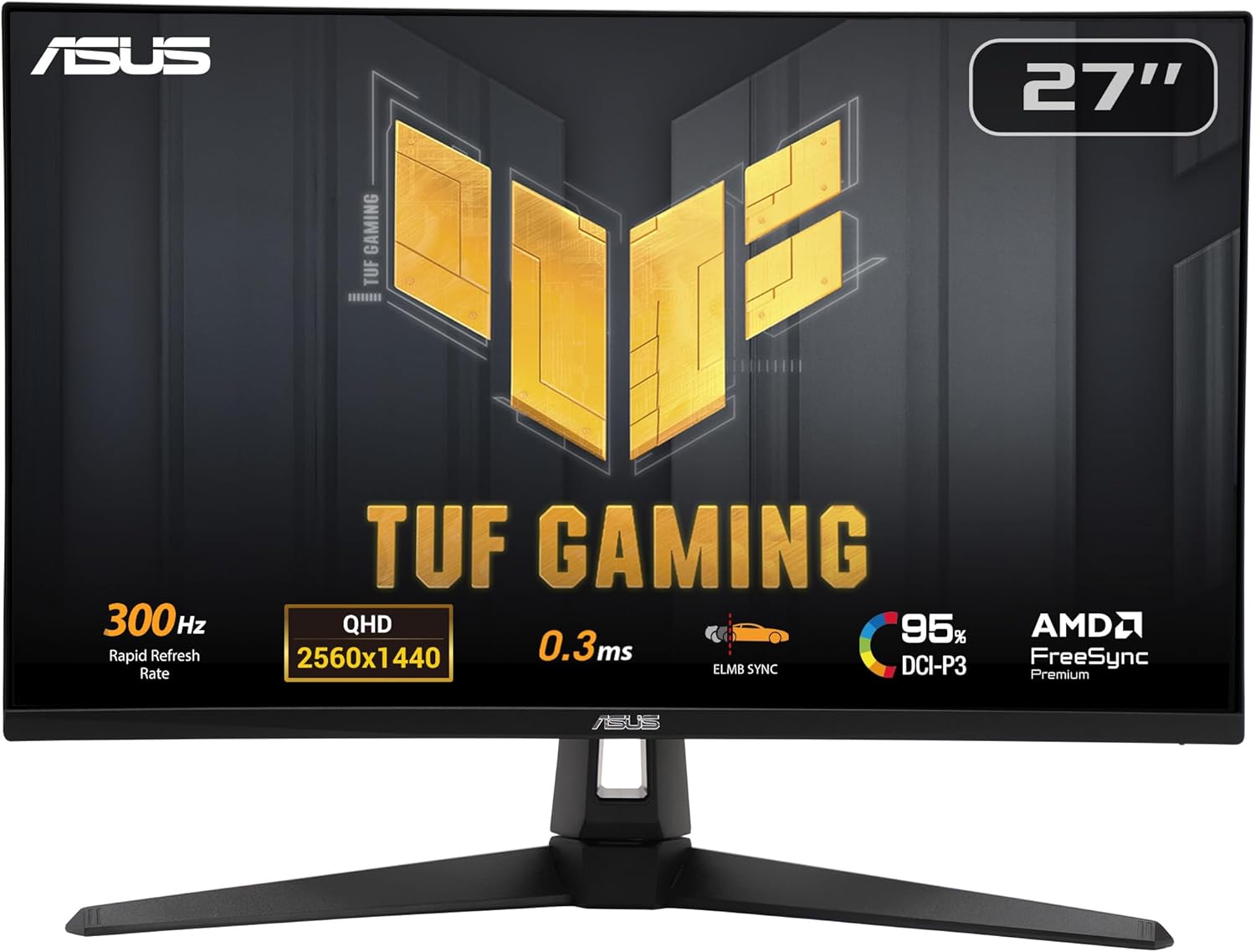 Best for 300Hz Esports ASUS TUF VG27AQM5A 300Hz | 27-inch Fast IPS 300Hz refresh rate 0.3ms GtG response 95% DCI-P3 coverage | 4.4Product rating | Check Price |
 Best for Laptop Hybrid Setups ASUS ROG XG27ACS USB-C | 27-inch QHD IPS 180Hz refresh rate USB-C hub included G-Sync compatible support | 4.4Product rating | Check Price |
The Odyssey G5 G51F is one of the most sensible starting points for anyone moving from a 1080p 60Hz display to a proper gaming screen. The combination of a 27-inch QHD panel and a 180Hz refresh rate hits a sweet spot that works well for competitive shooters and story-driven games alike without demanding a top-tier GPU.
The 1ms response time and FreeSync support help keep motion clean and tear-free, particularly in fast-paced titles where frame rates can fluctuate. QHD at 27 inches offers roughly 1.7 times the pixel density of Full HD, which translates to visibly crisper text, cleaner edges, and more detail in distant game objects than a comparable 1080p screen.
Features like Black Equalizer let you brighten dark areas of the image so enemies hiding in shadow are easier to spot. The ergonomic stand with tilt, pivot, and height adjustment is a genuinely useful inclusion at this price point, since many entry-level gaming displays ship with tilt-only stands that force awkward posture over long sessions.
Think of this one as the sensible mainstream pick. If you want a reliable 1440p 180Hz experience without stretching to OLED or 240Hz pricing, it covers nearly everything most players need. Enthusiasts chasing deep HDR impact or sub-millisecond response should look higher up the list.
A mid-range current-generation graphics card is usually enough to drive 1440p at high frame rates in most titles. If your GPU struggles, dropping a few settings keeps frame rates near the 180Hz ceiling without losing the sharpness benefit of QHD.
Players who want true HDR impact, OLED contrast, or refresh rates above 180Hz should look at the Odyssey OLED G6 or the LG UltraGear 27GX704A instead.
We may earn a commission when you buy through this link, at no additional cost to you.
The Odyssey OLED G6 brings QD-OLED into a traditional 27-inch 1440p form factor, which is a format most PC gamers already run. The result is a monitor that trades the sheer brightness of top IPS panels for the deep blacks, per-pixel contrast, and color volume that only self-emissive displays can deliver.
At 240Hz with a 0.03ms response time, motion looks clean enough that fast camera movement in shooters and racing games retains detail that LCD panels tend to blur. The Pantone-validated color coverage is useful if you also do photo or video editing on the same screen, giving the monitor more utility than purely as a gaming display.
Glare Free technology helps reduce reflections from windows or lamps, which is a practical plus for rooms with mixed lighting. OLED Safeguard features aim to reduce the risk of burn-in through thermal management and automatic maintenance cycles, though static elements like taskbars still deserve some caution over the long term.
Choose this one if contrast and color fidelity matter as much as frame rate. For single-player cinematic games, HDR movies, and competitive play that still needs beautiful visuals, it is one of the most compelling 27-inch options available. Pure esports players chasing 300Hz or more may prefer the TUF VG27AQM5A instead.
Hide the taskbar when possible, enable screen savers, and let the monitor run its pixel maintenance routines when it asks. These small habits meaningfully extend the useful lifespan of any OLED panel.
Buyers who leave static UI elements on screen for hours, like developers or spreadsheet-heavy users, may be happier with an IPS panel such as the ASUS TUF VG27AQ3A.
We may earn a commission when you buy through this link, at no additional cost to you.
The 32-inch Odyssey G55C targets players who want their monitor to wrap into their peripheral vision rather than sit flat on the desk. The 1000R curvature is one of the most aggressive available, roughly matching the natural curve of the human eye, which can make large single-player worlds feel more enveloping.
At QHD resolution across 32 inches, pixel density is slightly lower than on a 27-inch 1440p panel, but still noticeably sharper than Full HD. The 165Hz refresh rate and 1ms MPRT response handle fast-paced action well, and FreeSync support keeps tearing in check across supported graphics cards. HDR10 adds depth to highlights and shadows, though it is not a true high-brightness HDR experience.
Eye-focused features like Eye Saver Mode and flicker reduction are useful for long sessions, especially for players who notice fatigue after extended play. The larger panel size also makes the monitor more flexible for productivity, giving plenty of room for multiple windows side by side without needing a dual-monitor setup.
This is a strong pick for single-player gamers, simulation fans, and anyone who prefers one large curved screen over a flat panel. Competitive players who prioritize precise aim at long distances might prefer a flat 27-inch option instead.
Sit near the center of the curve and roughly an arm's length away. Too far back and the curvature loses its effect; too close and the edges can feel distorted.
Players who do a lot of design or photo work, where straight lines matter, often prefer flat panels like the Odyssey G50F or ASUS TUF VG27AQ3A.
We may earn a commission when you buy through this link, at no additional cost to you.
The 32-inch G50F adapts the familiar Odyssey G5 formula into a larger flat IPS format, aimed at players who want a bigger screen but prefer not to have a curved panel. It is a flexible choice for mixed-use desks that handle gaming, work, and media in roughly equal measure.
The IPS panel delivers wide 178-degree viewing angles, which keeps colors and contrast consistent whether you are centered or leaning. QHD at 180Hz hits a modern baseline for high-refresh PC gaming, and G-Sync compatibility means NVIDIA GPU owners can enable adaptive sync for smoother gameplay. Features like Black Equalizer and Virtual Aim Point can give small advantages in competitive titles.
Auto Source Switch Plus is a convenient feature for users who connect multiple devices such as a desktop and a console. The ergonomic stand with pivot, tilt, and swivel adjustments makes it practical for workflows that benefit from portrait rotation, like coding or reading long documents.
Pick this one if you want the real estate of a 32-inch panel without a curve, and if you prefer the color consistency of IPS to the deeper contrast of VA. Players focused on cinematic contrast may find a VA or OLED panel more satisfying.
QHD on a 32-inch panel is sharper than Full HD but slightly less dense than QHD at 27 inches. For most gaming it is more than adequate, though users who sit very close may notice individual pixels.
Buyers who want deeper blacks or stronger HDR impact should consider the curved G55C or the Odyssey OLED G6 instead.
We may earn a commission when you buy through this link, at no additional cost to you.
The 34-inch ultrawide G5 is aimed at players who want a cinematic field of view without buying a second monitor. The 21:9 aspect ratio with 1000R curvature extends into your peripheral vision in a way standard 16:9 panels cannot, which can make driving sims, open-world games, and flight sims feel noticeably more immersive.
The VA panel offers deeper native contrast than typical IPS alternatives, giving night scenes and shadowy areas a richer look. WQHD at 165Hz with 1ms MPRT keeps motion fluid in fast action, and FreeSync Premium with Low Framerate Compensation helps smooth out frame rate dips that are common in demanding ultrawide gaming.
Beyond gaming, the extra horizontal space is useful for productivity. Side-by-side documents, wide timelines in video editors, and multi-column dashboards all benefit from the extended real estate without the bezel gap of a dual-monitor arrangement. HDR10 adds visual depth that complements the VA panel's natural contrast strength.
This is a strong pick for immersive single-player play and productivity. Competitive esports players who rely on crisp central aim may prefer a flat 27-inch QHD or OLED panel, since the curved edges and wider field of view can take some adjustment.
Most modern games support 21:9 natively, but some older or competitive titles do not. Checking your most-played games for ultrawide support helps avoid surprises after setup.
Players who need the sharpest text and highest pixel density for productivity should look at a 27-inch QHD panel like the TUF VG27AQ3A instead.
We may earn a commission when you buy through this link, at no additional cost to you.
The LG UltraGear 27GX704A is one of the more complete OLED gaming monitors in the 27-inch QHD class. It targets players who want the pixel-level contrast and response of OLED combined with console-friendly connectivity, since dual HDMI 2.1 ports allow both a PS5 and an Xbox Series X to run at 4K-capable bandwidth alongside PC inputs.
The 240Hz refresh rate and 0.03ms response time make motion extremely clean, so fast camera flicks and quick enemy movements stay readable. DisplayHDR True Black 400 certification combined with a quoted peak brightness around 1300 nits allows HDR scenes to pop while retaining the deep blacks that define OLED. Up to 98.5% DCI-P3 coverage also makes it strong for color-critical work.
The glossy finish gives colors extra depth and contrast but is more reflective than a matte coating, so it benefits from a controlled lighting environment. LG includes OLED care features such as automatic pixel maintenance cycles, adjustable brightness limits, and image retention mitigation that run during standby or shutdown, which help offset the long-term risks of OLED technology.
Choose this one if you want a modern flagship that can serve both a high-end PC and current-generation consoles without compromise. Buyers on tighter budgets or those who leave static desktop elements on screen all day will be better served by an IPS panel.
HDMI 2.1 provides the bandwidth modern consoles need for 4K at high refresh rates and VRR. Having two of them means you can plug in two consoles without unplugging cables when you switch devices.
Users with very bright rooms, or those running mostly static content for hours each day, may prefer a matte IPS display like the ASUS TUF VG27AQ3A.
We may earn a commission when you buy through this link, at no additional cost to you.
The AOC Q27G41ZE pushes refresh rate as its headline feature, with a QHD IPS panel that can overclock to 260Hz through DisplayPort. For competitive FPS players who want the fluidity of a very high refresh rate without stepping into OLED pricing, it is a particularly interesting proposition.
The 2560×1440 resolution strikes a good balance of visual clarity and GPU demand, and Fast IPS keeps viewing angles wide while reducing the motion blur that plagued older IPS panels. Adaptive-Sync support covers both AMD and NVIDIA GPUs, which simplifies setup regardless of which graphics card you own.
Shadow Control and preset Game Modes offer quick tuning for different genres, and the user-friendly OSD makes it easy to adjust settings without hunting through buried menus. The frameless three-sided design and textured accents give the monitor a modern look that fits well on streaming or showcase desks.
The main compromise is ergonomics: the stand offers tilt only, so you may want to pair it with a VESA monitor arm if you need height or pivot adjustment. For players who prioritize raw speed and image clarity, this is a competitive choice in its price band.
If posture matters to you, budget for a basic VESA arm. A proper height-adjustable mount transforms the ergonomics of any tilt-only monitor without replacing the display.
Buyers who want strong HDR performance or deep contrast should look at the Odyssey OLED G6 or LG UltraGear 27GX704A instead.
We may earn a commission when you buy through this link, at no additional cost to you.
The ASUS TUF VG27AQ3A has become a popular reference point for well-rounded QHD gaming monitors. It avoids chasing the highest refresh rate or peak brightness in favor of a balanced package that handles both competitive games and single-player titles without serious compromises.
The 27-inch Fast IPS panel delivers 1440p at 180Hz with a 1ms response time and 130% sRGB coverage, which supports both colorful game worlds and general content creation. ELMB Sync is a particularly useful feature because it allows motion blur reduction to work alongside variable refresh rate, something many monitors force you to choose between.
G-Sync compatible certification and FreeSync Premium together mean you can run tear-free gameplay regardless of GPU vendor. The integrated speakers are useful for casual listening or quick setup, though serious gamers will usually prefer a headset or dedicated speakers. HDR-10 support rounds out the feature set, though peak brightness is modest.
This is a strong default recommendation for players who are not sure what they want. It covers the fundamentals well and leaves little that most gamers will miss. Buyers who want the absolute lowest motion smearing or OLED-level contrast should look at the OLED options instead.
180Hz is comfortably past the point where most players notice meaningful smoothness gains for the dollar. It also stays within reach of mainstream GPUs at QHD, so you are more likely to hit the refresh rate ceiling in real games.
Competitive players chasing 240Hz or more should consider the TUF VG27AQM5A or the LG UltraGear 27GX704A OLED instead.
We may earn a commission when you buy through this link, at no additional cost to you.
The ASUS TUF VG27AQM5A pushes refresh rate as its defining feature while keeping the practical 27-inch QHD format. At 300Hz with 0.3ms GtG response, it is aimed squarely at competitive gamers who want the smoothest possible motion on a Fast IPS panel.
The 95% DCI-P3 color coverage is a notable addition for a competitive-focused display, giving the panel more visual range than many strictly esports-oriented monitors. Shadow Boost enhances detail in dark areas without blowing out bright scenes, a practical help in shooters where enemies often hide in corners.
ELMB Sync allows motion blur reduction to run alongside variable refresh rate, and the DisplayWidget Center software makes it easy to tweak settings using a mouse rather than fiddling with buttons on the back of the monitor. The three-year warranty adds some reassurance for buyers investing in a higher-refresh display.
To get the most from 300Hz at QHD, you need a strong GPU and games that can actually reach those frame rates. If you play a lot of competitive shooters where frame rate directly influences aim, this is a logical pick. More casual players may not notice the gap over 180Hz and can save money elsewhere.
Diminishing returns are real above 240Hz, but reductions in input lag and motion blur still exist. Players who are highly sensitive to responsiveness and run competitive titles tend to benefit most.
Buyers with mid-range GPUs or those focused on single-player cinematic games will usually be happier with the TUF VG27AQ3A at 180Hz.
We may earn a commission when you buy through this link, at no additional cost to you.
The ROG XG27ACS stands out in this lineup because of its USB-C port, which allows a compatible laptop to connect for video, data, and in some cases power through a single cable. For hybrid work-and-play setups where the same screen serves a desktop by day and a gaming laptop by evening, this is a genuinely useful feature.
The underlying panel is a 27-inch QHD Fast IPS with a 180Hz refresh rate and 1ms response time, which gives it the same core gaming credentials as other mainstream 1440p displays in this guide. ELMB Sync, G-Sync compatibility, and HDR support complete the gaming feature set and keep it competitive against purpose-built screens.
DisplayWidget Center provides mouse-driven access to monitor settings, which is faster and less frustrating than scrolling through on-screen menus with physical buttons. The USB hub functionality can also tidy up a desk by letting peripherals plug into the monitor rather than directly into the PC or laptop, reducing cable clutter at the main machine.
Choose this one if USB-C connectivity is important to your workflow or if you expect to pair the monitor with a laptop regularly. If you only ever game on a desktop, the TUF VG27AQ3A offers similar gaming performance for less money.
Not every USB-C port supports video output. Confirm that your laptop's USB-C port supports DisplayPort Alt Mode before relying on single-cable connectivity, and check the monitor's power delivery wattage against your laptop's needs.
Desktop-only gamers who do not need USB-C can usually get similar gaming performance for less with the ASUS TUF VG27AQ3A.
We may earn a commission when you buy through this link, at no additional cost to you.
A monitor is a long-term purchase that shapes every hour spent at your PC. The right one depends on the games you play, the GPU driving it, your desk setup, and whether you value speed, image quality, or sheer size most.
Panel type is one of the most important decisions. IPS panels offer wide viewing angles and accurate colors, making them a safe choice for mixed use between gaming, creative work, and general productivity. Modern Fast IPS variants have mostly closed the gap on response time, so motion looks clean in all but the most demanding scenes. The main compromise is contrast; blacks tend to look slightly gray compared to VA or OLED.
VA panels deliver deeper native contrast and are common in curved displays, which makes them attractive for cinematic single-player gaming in darker rooms. The trade-off is slightly slower pixel response in some transitions, which can cause mild smearing in fast dark scenes. OLED technology, including the QD-OLED variants in this guide, provides per-pixel contrast, instant pixel response, and vibrant colors, but requires some care around static images to reduce long-term burn-in risk.
If you want one safe recommendation, modern Fast IPS is the most versatile choice. Choose VA if contrast matters more than motion, and OLED if you want the best image quality and are willing to adopt its care habits.
Resolution and screen size should be considered together, because pixel density affects how sharp the image looks. QHD at 27 inches is widely regarded as a strong sweet spot for PC gaming, giving noticeably sharper visuals than Full HD without demanding a flagship GPU. QHD on a 32-inch panel is still sharper than 1080p but less dense; it suits players who sit a bit further from the display.
4K provides stunning sharpness, especially above 27 inches, but demands significantly more GPU power to drive at high frame rates in modern games. Ultrawide WQHD monitors offer a cinematic field of view without the extreme GPU demand of 4K, and work especially well for immersive single-player and sim games. For dense productivity work alongside gaming, more pixels generally help.
Match resolution to your GPU and viewing distance. If your current graphics card struggles at QHD, dropping settings is often preferable to buying a lower-resolution monitor you may want to replace sooner.
Refresh rate determines how many frames per second your monitor can display. Going from 60Hz to 144Hz or 180Hz is a dramatic improvement, especially in fast games. Beyond 180Hz, improvements continue but with diminishing returns for most players. 240Hz is a worthwhile step for competitive shooters, while 300Hz and above mostly benefit serious esports players with the hardware to reach those frame rates.
Response time measures how quickly pixels transition between colors. Lower is better, as it reduces ghosting and motion blur. Advertised figures vary in meaning: 1ms GtG, 1ms MPRT, and 0.03ms OLED response times are measured differently. Pay attention to real-world reviews rather than relying on headline numbers alone, since marketing specifications can be misleading.
For most buyers, QHD at 180Hz with 1ms response time is enough. Step up to 240Hz or OLED only if competitive play or motion clarity truly matter to you.
Adaptive sync technologies like NVIDIA G-Sync and AMD FreeSync synchronize your monitor's refresh rate with your GPU's output, eliminating screen tearing without the input lag of traditional V-Sync. Most modern gaming monitors support one or both standards, and the certified compatibility between the two has largely eliminated vendor lock-in concerns.
FreeSync Premium and G-Sync Compatible are the baseline certifications to look for. More advanced tiers like FreeSync Premium Pro add HDR considerations and low framerate compensation. In practice, enabling adaptive sync usually just works and makes gameplay smoother, especially when frame rates fluctuate below the monitor's maximum refresh rate.
Verify compatibility with your GPU brand, but do not treat this as a major restriction. Nearly all current monitors support both ecosystems well enough for excellent results.
HDR is one of the most inconsistently implemented monitor features. HDR10 support is now common, but the actual visual impact depends heavily on panel brightness, local dimming, and contrast. True HDR benefit requires brightness around 600 nits or more and ideally full-array local dimming or self-emissive technology like OLED. HDR10 on a 300-nit panel without dimming is essentially a color space change, not a true HDR experience.
Color gamut coverage matters for both gaming and creative work. 95% DCI-P3 or higher gives rich, saturated colors in modern HDR games and video content. If you also do photo or video editing, factory calibration and Pantone validation can be meaningful; most pure gamers can get by with the stock color profile and minor adjustments.
If HDR impact matters, prioritize OLED or genuinely bright HDR600+ IPS panels. If it does not, treat HDR10 as a bonus rather than a deciding factor.
Port selection increasingly matters as monitors double as hubs for multiple devices. DisplayPort 1.4 handles QHD at 240Hz and above on most modern GPUs. HDMI 2.1 is important if you plan to connect current-generation consoles, since it supports 4K at 120Hz with VRR. Having two HDMI 2.1 ports is a bonus for households with multiple consoles.
USB-C with DisplayPort Alt Mode is a growing feature, especially useful for laptop users who want single-cable video, data, and power delivery. USB hub functionality on the monitor itself helps reduce cable clutter and makes peripheral switching easier. Audio outputs are useful for connecting headphones or external speakers directly to the display.
List the devices you plan to connect before buying. If a monitor lacks the right ports, no amount of great panel quality will compensate for daily connectivity frustration.
Stand adjustability has a bigger effect on daily comfort than most buyers expect. A monitor with full tilt, height, swivel, and pivot adjustment can be fine-tuned to your posture and chair, which matters during long sessions. Tilt-only stands force compromises and often lead to neck or back strain over time.
VESA mount compatibility is a useful fallback. If you prefer a monitor arm, confirm the display supports the standard 100×100 mm mount pattern. Build quality matters too: smooth adjustments, stable bases, and good cable management keep the setup looking tidy and functioning well over years of use.
If a monitor you love has a weak stand, factor in the cost of a VESA arm. The ergonomic upgrade is almost always worth the extra investment.
Curved displays wrap into your peripheral vision, which can increase immersion in large environments. 1500R and 1800R curves are gentle and work well for mixed use. 1000R curves are more aggressive and tend to be best for pure gaming at a close viewing distance. Flat panels remain the preferred choice for productivity work and design tasks where straight lines matter.
Ultrawide 21:9 formats add horizontal space that transforms the feel of racing games, flight sims, and open-world titles. They also replace dual-monitor setups for many users, eliminating the bezel gap. The trade-off is reduced vertical space compared to a 16:9 panel of the same height, and occasional game compatibility issues with older titles.
If you mostly play immersive single-player games, consider a curved or ultrawide panel. If you want versatility for work and competitive play, a flat 27-inch QHD panel is still the most universally useful choice.
Setting up a new monitor well pays off every day afterward. Place the top of the screen roughly at eye level and the panel about an arm's length away. Use the stand's height, tilt, and swivel adjustments to match your chair and desk. Enable the monitor's highest refresh rate in your operating system display settings, as many monitors ship defaulting to a lower rate. Turn on adaptive sync in both the monitor OSD and your GPU control panel to eliminate tearing.
Calibrate basic image settings before diving into advanced tweaking. Reduce brightness to a comfortable level for your room; most monitors ship far brighter than needed. Set contrast to a mid-high value, choose a color temperature around 6500K for natural tones, and avoid oversaturation unless you specifically prefer it. For HDR content, enable HDR only when launching HDR-aware games or video, since Windows HDR handling can affect how desktop content looks.
Keep the display clean and well-maintained. Use a dry microfiber cloth for routine dust removal, and a very lightly dampened cloth with distilled water or screen-safe cleaner for stubborn marks. Avoid household glass cleaner, which can damage panel coatings. For OLED panels, enable pixel maintenance routines, hide the taskbar when gaming, and consider using a dark theme in applications you leave open for long periods. Avoid exposing the panel to direct sunlight or extreme temperature changes.
QHD at 1440p is widely considered the sweet spot for modern PC gaming because it delivers noticeably sharper visuals than 1080p without demanding a flagship GPU. 4K looks stunning, especially on larger panels, but requires significantly more graphics power to maintain high frame rates. Choose QHD if you want a balance of image quality and performance, and 4K if you have top-tier hardware or prioritize visual fidelity over frame rate.
Going from 60Hz to 144Hz or 180Hz is a dramatic improvement that most players notice immediately. Jumping from 180Hz to 240Hz is subtler but still worthwhile for competitive players. Above 240Hz, improvements continue but diminish, and real benefits require a GPU capable of pushing those frame rates in your actual games. For most buyers, 180Hz hits an excellent balance of smoothness, hardware demands, and price.
OLED panels deliver the best contrast, color, and motion performance currently available on consumer monitors. They are excellent for gaming, movies, and HDR content. The main considerations are higher cost and the long-term risk of image retention from static content. If you play varied content and are willing to adopt simple habits like hiding the taskbar and letting pixel maintenance cycles run, OLED is a strong choice. For heavy productivity use with static windows, IPS may be safer.
Curvature can meaningfully increase immersion, especially on larger panels and ultrawide formats, by filling more of your peripheral vision. A 1000R curve is particularly immersive at a normal desk distance. Curvature matters less on 27-inch flat panels and can even be a drawback for design work where straight lines are important. If you primarily play immersive games, consider curved; if you do mixed productivity and gaming, flat is usually more versatile.
G-Sync Compatible monitors use VESA Adaptive-Sync and have been validated by NVIDIA to work well with GeForce GPUs. True G-Sync and G-Sync Ultimate monitors contain a dedicated NVIDIA module and often support a wider refresh range plus variable overdrive. For most buyers, G-Sync Compatible is more than enough and leaves budget for other features. The visual difference in normal gaming is small for the vast majority of players.
HDMI 2.1 matters most if you plan to connect current-generation consoles like the PS5 or Xbox Series X, since it enables 4K at 120Hz with VRR. For PC gaming via DisplayPort, HDMI 2.1 is less critical because DisplayPort 1.4 handles QHD at very high refresh rates well. If you plan to use a console on the same display, prioritize monitors with HDMI 2.1 and ideally two HDMI 2.1 ports for multi-device setups.
Response time affects how quickly pixels change color, which influences motion clarity and ghosting. For fast-paced games, a 1ms rating or lower is desirable. However, how response time is measured varies between brands and panel types, so comparing numbers alone can be misleading. Fast IPS, VA with good overdrive tuning, and OLED all produce clean motion in practice. For most buyers, 1ms GtG or similar is more than adequate.
A 32-inch monitor at QHD resolution is noticeably larger than a 27-inch display and provides more immersion for games and more workspace for productivity. The main consideration is desk depth; you want to sit roughly 70 to 90 centimeters from a 32-inch screen for comfortable viewing. Pixel density at QHD is slightly lower than at 27 inches, so text may look softer. Visit a store to see one in person before deciding if possible.
Built-in monitor speakers are convenient for casual listening, system sounds, or quick video playback. However, they are typically basic and not suitable for immersive gaming or music. Most gamers use a headset or dedicated speakers for serious play. If speakers are important, treat built-in audio as a bonus rather than a primary decision factor, and verify the quality is at least adequate for your intended use.
Yes, adaptive sync is nearly always worth enabling. Technologies like FreeSync and G-Sync Compatible synchronize the monitor's refresh rate to your GPU's output, eliminating screen tearing without the input lag of traditional V-Sync. Enabling it in both the monitor's OSD and the GPU control panel typically just works and makes gameplay smoother, especially when frame rates fluctuate. There is very little downside to turning it on.
If you want a single well-rounded recommendation, the ASUS TUF VG27AQ3A is the easiest to suggest confidently. Its Fast IPS panel, QHD resolution, 180Hz refresh rate, ELMB Sync, and dual G-Sync and FreeSync Premium support cover nearly everything most PC gamers need. It avoids extremes in either direction, which makes it a safe and satisfying default for players who are not yet sure what features matter most to them.
For buyers with specific priorities, the shortlist adapts well. The Samsung Odyssey G5 G51F offers excellent value for 1440p 180Hz gaming on a budget. The LG UltraGear 27GX704A and Samsung Odyssey OLED G6 deliver top-tier OLED image quality for enthusiasts. The 32-inch and ultrawide Odyssey models suit immersive single-player gaming, while the AOC Q27G41ZE and ASUS TUF VG27AQM5A push refresh rates for competitive players. The ASUS ROG XG27ACS stands out for hybrid laptop setups thanks to its USB-C connectivity.
When making the final decision, start with the games you actually play and the GPU you own. Match resolution and refresh rate to what your hardware can deliver, prioritize panel technology based on whether you value color, contrast, or speed most, and verify that the port selection fits your other devices. A monitor you keep for several years should match your real-world setup rather than the setup you occasionally wish you had. Any of the ten displays above can be the right choice for the right buyer.